Introduction

  1. oVORhBfiDYHfVBdm
    oVORhBfiDYHfVBdm
    lLhBLd5gelh4vynp
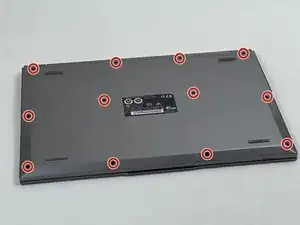
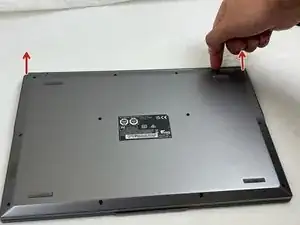
    • Remove the screws.

    • Lift the cover.

  2. qEWUTJDGRIGFjJJV
    qEWUTJDGRIGFjJJV
    y3IhCgZr11OcimCG
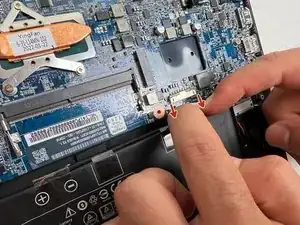
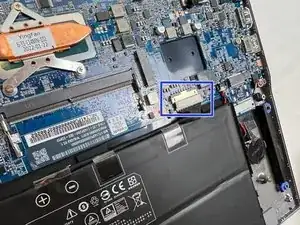
    • For safety reasons, the battery must be disconnected before each intervention.

    • Disconnect the battery your fingers.

    • Other components can now be replaced safely.

  3. dnZpxWmZuWUqvreI
    dnZpxWmZuWUqvreI
    unRV2mJOZcyKZQPm
    bcYv1q1OtKydNvQr
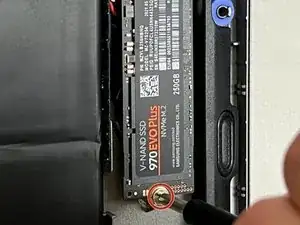
    • Unscrew the screw.

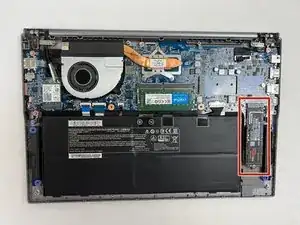
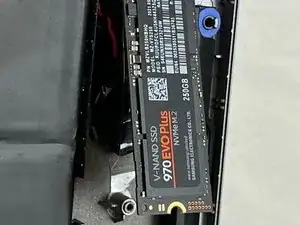
    • The SSD will lift by itself.

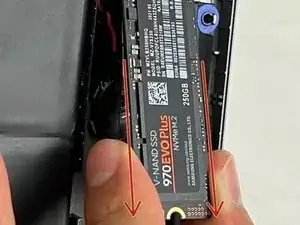
    • Remove the SSD.

Conclusion

To reassemble your device, follow the steps in reverse order.

Felice Suglia

Member since: 15/06/13

33538 Reputation

0 comments