Introduction

  1. HLCEa5SQAU5paQkp
    • Confirm equipment information

    • This tutorial will reset your iPhone, please be careful.

    • We welcome anyone to translate this tutorial into any language, to start translatingplease click here

  2. 5BOwLWdqSr3eg1WI
    • Long press the power button

    • Slide to power off your iPhone

    • It is recommended to continue operation when the battery level drops below 25%.

  3. FlTIIJtLAFtuiqcu
    • This operation has no introduction

    • Use a wet wipe or similar to clean your phone.

  4. TZLbjPCHvMNmU5BL
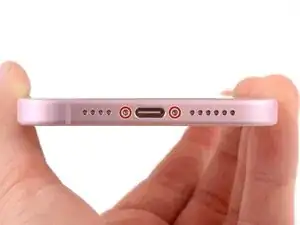
    • Use a screwdriver to unscrew the screw next to the phone's speaker

  5. nkpTPtIHpqPOCu3m
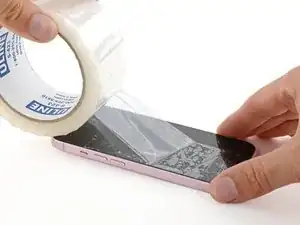
    • To protect yourself and make it easier to remove, cover any severely cracked screen or back glass with overlapping layers of packing tape.

    • Ensure a sufficiently large, smooth surface near the bottom edge is available for the suction cup to adhere to.

  6. ZWZNArKSDlyfXwor
    • If inserted too deeply, the open-end tweezers may damage your device. Follow these steps to mark your tweezers to prevent damage.

    • Start from 3 mm of the tip and mark the open-end tweezers by using a marker.

    • You can also mark with different measurements the other edges of the tweezers.

    • Or, attach a coin 3 mm from the tip of the tweezers.

Conclusion

To reassemble your device, follow these instructions in reverse order.

yuzhengxuan130619@163.com

Member since: 23/03/25

542 Reputation

0 comments